
Most people need 16GB of RAM for modern laptop tasks to keep apps running fast and smoothly. While 8GB works for simple web browsing and light homework, 16GB helps prevent sudden slowdowns when opening many browser tabs or during video calls.
Have you ever tried to work on a tiny desk? You put down your laptop. Next, you set down a notebook. Then you add a cup of water. Suddenly, you have no room left. Things fall off the edge. You have to move items around just to find your pen.
That is exactly how RAM works inside your laptop. Understanding how much memory you need will save you money and keep your computer fast.
Let’s discover how to pick the perfect memory size for your daily needs and budget.
How Does Laptop RAM Actually Work?
Laptop RAM is short-term memory that acts like a workspace for your computer. It holds active apps, web browser tabs, and files so your processor can reach them instantly. When you run out of RAM, your laptop slows down because it has to use slower storage space instead.
Imagine your computer memory is like a super-fast librarian. When you open an app, the librarian grabs that file and sets it on your desk. As long as the file stays on your desk, you can read it instantly.
If you open twenty browser tabs at once, you are filling up that desk. Each tab takes up a little bit of space. Web browsers like Google Chrome love big desks. They take up a lot of memory space to keep pages fast.
When your desk gets full, the librarian has to move old files back to a faraway storage shelf. That movement takes extra time. That is why your laptop starts to freeze, stutter, or lag. Having enough RAM keeps your virtual desk clean and fast.
How Much RAM Do You Need for Your Daily Tasks?
For light tasks like reading news and watching videos, 8GB of RAM is enough. However, 16GB of RAM is the recommended standard for smooth multitasking, office work, and heavy web browsing. Creators and gamers should choose 32GB of RAM for heavy video editing and complex programs.
Not everyone needs the same size desk. The right amount of memory depends on what you do every single day. Here is a simple breakdown of the three main levels of laptop memory.
8GB of RAM: The Basic Tier
This size is fine for light users. If you only check email, type simple documents, and stream movies, 8GB is enough. However, modern programs use more memory than they used to. Shifts in software demand are pushing entry-level laptops toward higher base specs.
16GB of RAM: The Sweet Spot
This is the magic number for most people today. With 16GB, you can keep dozens of browser tabs open without any stress. You can jump into a video call, edit a big spreadsheet, and listen to music all at the same time. Everything feels smooth and quick.
32GB of RAM or More: The Power User Tier
This high level is for heavy-duty tasks. You only need 32GB if you perform specialized jobs. This includes editing 4K videos, writing complex code, designing work, or playing brand-new video games. For normal daily tasks, 32GB is more than you will ever use.
Comparing Laptop Memory Sizes
Here is a simple side-by-side view to help you match your daily habits with the right memory size.
| Memory Size | Best For | Multitasking Ability | Future Value |
| 8GB RAM | Web browsing, light homework, video streaming | Low (handles 1 to 2 apps at once) | Limited for upcoming software updates |
| 16GB RAM | Work, school, heavy browsing, light gaming | High (handles many apps and tabs) | Great value for the next several years |
| 32GB RAM | Video editing, 3D design, heavy gaming | Extreme (handles huge creative files) | Very high for professional power users |
Can You Upgrade the RAM in Your Current Laptop?
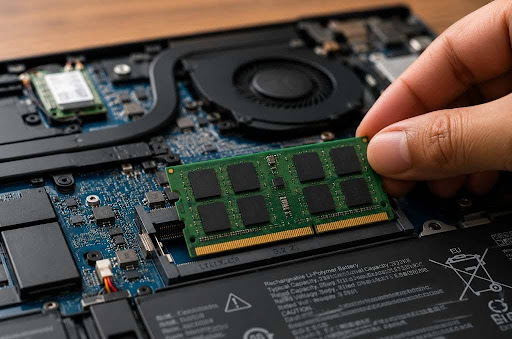
Some laptops allow you to add more memory easily by opening a door on the bottom. Other thin laptops have memory chips soldered directly onto the main system board, which means you cannot upgrade them later. You must check your laptop model before buying new memory.
If your current computer feels slow, you might not need a brand-new laptop. You can look into laptop RAM upgrade options to give your old machine a fresh start.
Adding an extra stick of memory can instantly make an old laptop feel brand new. It expands your desk space so your laptop stops lagging. However, many thin modern laptops have memory that is glued or soldered down.
Before spending money on new parts, check your user manual or look up your model online. Make sure your computer actually has open slots for a memory upgrade.
Actionable Takeaways to Boost Your Laptop Performance
- Check your current memory use: Open the Task Manager on Windows or Activity Monitor on a Mac to see how much RAM you use during a normal workday.
- Close unused browser tabs: Each open tab steals a small piece of your memory. Close tabs you do not need.
- Restart your laptop weekly: Restarting clears out clogged short-term memory files and resets your system desk.
- Buy 16GB if shopping for a new laptop: If you are buying a new computer today, choose 16GB of RAM so your machine stays fast for years.
- Research your upgrade path: Check whether your current model supports RAM upgrades before buying a replacement laptop.
Conclusion & Next Steps
Finding the right amount of RAM comes down to how you use your computer.
For simple daily tasks, 8GB can get you by. But for a smooth, frustration-free experience that lasts for years, 16GB of memory is the ideal choice for most people. It gives you plenty of room to work, play, and browse without annoying slowdowns.
Check your system settings today to see how much RAM you have installed, and explore your upgrade options before buying a whole new machine!